 Celebrate with up to 80% off
What is SSO and why it matters for secure, seamless access


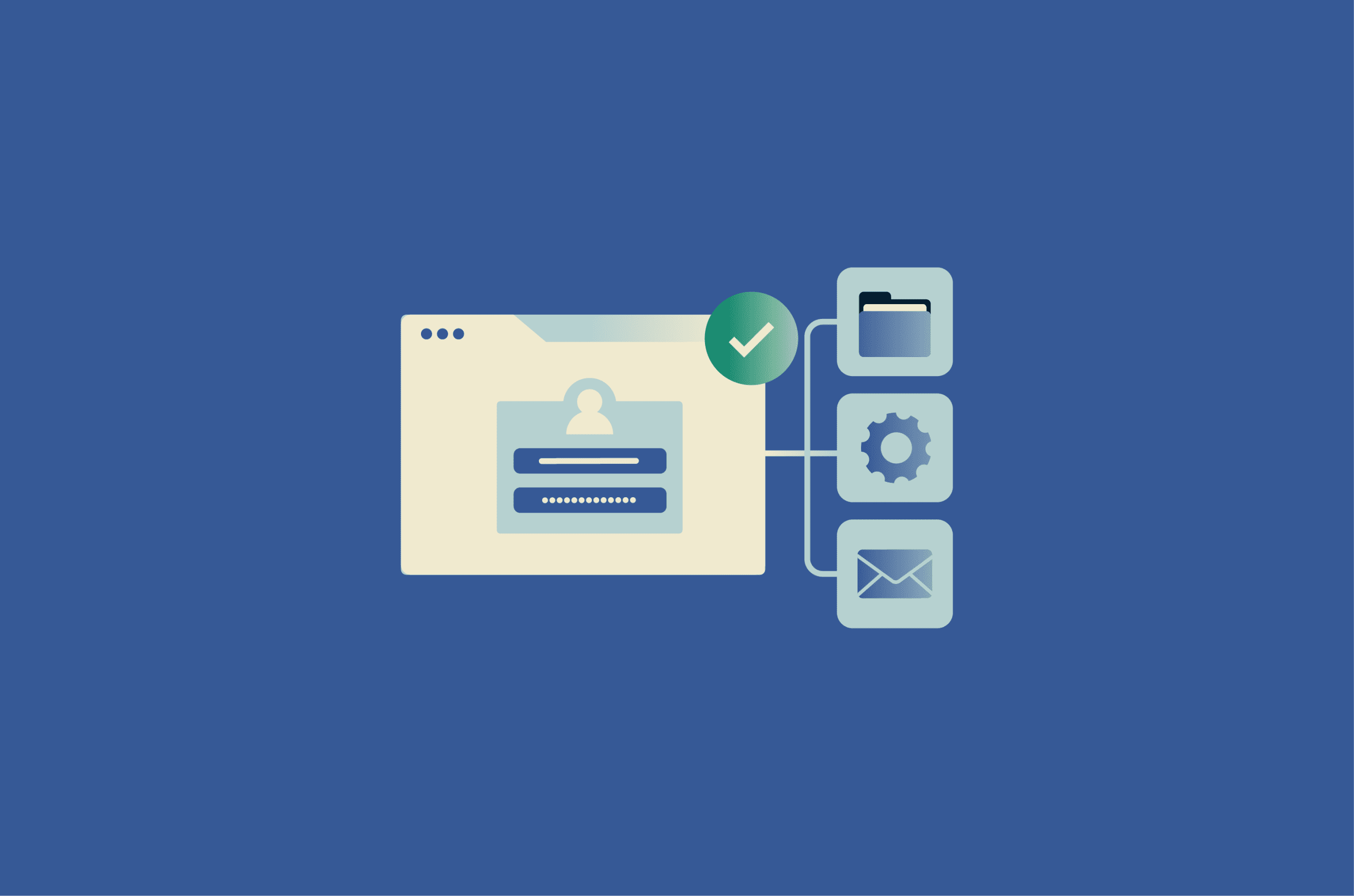
Managing access across multiple systems is now a baseline requirement for most organizations, with users moving between cloud apps, internal tools, and external services throughout the day. Single sign-on (SSO) is commonly used to reduce login friction and centralize authentication across those systems.
What SSO means
SSO is an authentication approach that lets users access multiple connected applications after signing in once. Instead of entering a separate username and password for every tool, users authenticate once and are then recognized across participating systems.
In practice, SSO creates a noticeably smoother login experience. A familiar example is Google's ecosystem: after signing in once, a user can often move between Gmail, YouTube, Google Drive, Google Calendar, and other connected services without signing in separately to each one.
The same principle applies in enterprise settings, where an employee might sign in once through a company portal to access email, an HR system, a project tracker, and a customer relationship management (CRM) system.
This differs from a traditional direct-login model, where each application manages its own credentials independently. In that setup, users maintain separate sign-in credentials for each service, and each login is handled separately.
How does SSO work
SSO may seem seamless to the user, but it relies on a structured process behind the scenes. Understanding that process helps explain how one login can be recognized across multiple applications.
The system revolves around two key players: a centralized identity provider (IdP) that verifies the user and one or more service providers (SPs), which are the individual applications the user wants to access.
When a user opens an application, it redirects them to the IdP. The IdP authenticates the user and issues a trusted assertion, token, or session that participating applications can rely on to recognize the signed-in user. From that point on, connected applications can validate that information and grant access without requiring a separate login.
Crucially, the user's password is generally not shared with each individual application. Instead, the IdP shares trusted identity and authentication information, such as who the user is and when they authenticated, with connected services. This is what allows multiple applications to recognize the same authenticated user within a single session.
Also read: Token-based authentication explained: How it works, benefits, and best practices.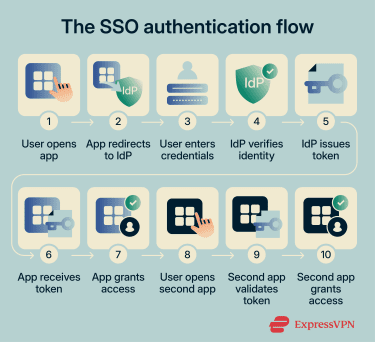
Common protocols used in SSO
SSO relies on open standards (often called federation protocols) that enable IdPs and SPs to communicate. These are the most widely used:
- Kerberos: A ticket-based network authentication protocol that uses secret-key cryptography to verify users and services. Kerberos is the default authentication protocol in Microsoft Active Directory (AD) environments and is primarily used for on-premises and internal network authentication.
- Security Assertion Markup Language (SAML): An Extensible Markup Language (XML)-based standard for exchanging authentication and related identity information between an IdP and an SP. SAML remains widely used in enterprise web applications and is supported by many major IdPs.
- Open Authorization (OAuth) 2.0: An authorization framework that lets applications request limited access to a user's resources without receiving their password. OAuth handles what an application is allowed to do on the user's behalf (for example, read calendar events), but it doesn’t by itself verify the user's identity.
- OpenID Connect (OIDC): An identity layer built on top of OAuth 2.0 that adds authentication. When a user signs in, OIDC returns an ID token, a JSON Web Token (JWT), that confirms the user's identity. OIDC is widely used in modern consumer sign-in flows, mobile apps, and single-page web apps.
Also read: What is NTLM? Understanding this legacy authentication protocol.
Types of single sign-on
SSO can take several forms depending on the environment, the applications involved, and how identity is managed.
Web SSO
Web SSO is one of the most common forms. It works through the browser: when a user tries to access a web application, the app redirects them to the IdP for authentication using a federation protocol such as SAML or OIDC. Once the IdP issues a token, other web applications validate the token's signature against the IdP and grant access based on the verified identity. This model is standard in organizations that rely on multiple Software-as-a-Service (SaaS) or intranet applications.
Mobile SSO
It extends SSO to smartphones and tablets, allowing users to sign in once and access multiple mobile apps more easily. It commonly relies on OIDC and platform-supported sign-in flows, and it can integrate with device biometrics (such as fingerprint or face recognition) as an additional authentication factor.
Federated SSO
Federated SSO allows users to access services across organizational boundaries. Rather than each organization maintaining its own login for the same user, two or more organizations can establish a trust relationship so that a single IdP can authenticate a user and share that identity with external services via protocols such as SAML or OIDC.
A common example is a company giving a partner's employees access to shared project tools without issuing them a separate set of credentials.
Learn more: What is federated identity? A complete guide to secure and seamless authentication.
Social SSO
Social SSO lets users sign in to third-party applications using an existing consumer account, such as Google, Apple, or Facebook. It commonly uses OIDC, often alongside OAuth 2.0, and is common on consumer-facing websites where reducing sign-up friction matters.
However, because one account can unlock access to many connected services, a compromised social account can affect multiple services at once.
Enterprise SSO
Enterprise SSO can take a different approach for some applications. Instead of relying on federation protocols, it uses client-side software to store a user's credentials and automatically replay them into applications, including older or proprietary systems that don't support modern SSO standards.
The user still logs in once, but behind the scenes, the enterprise SSO agent fills in login forms on their behalf. This makes enterprise SSO a practical option for organizations running legacy applications alongside modern ones.
Benefits of using SSO
SSO offers tangible advantages for both users and organizations.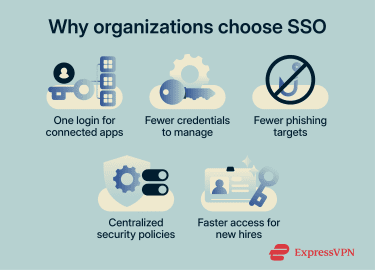
Increased productivity
Logging into separate systems throughout the day takes time. With SSO, users authenticate once and move between applications more easily.
A 2023 Forrester study commissioned by Microsoft found that consolidating identity and providing users with a single login for critical applications saved employees an average of 10 minutes per week in year 1, rising over time as more apps were integrated. In the study’s model, that equated to about 8 hours saved per user in year 1, 10 hours in year 2, and 13 hours in year 3.
Stronger security
Because users authenticate through a single trusted IdP rather than across dozens of individual login pages, there are fewer opportunities for phishing attacks that rely on fake or lookalike login screens.
SSO also gives organizations a centralized place to enforce security policies, such as multi-factor authentication (MFA), password complexity requirements, and conditional access rules, consistently across all connected applications. When integrated with threat detection and risk-based access controls, it can also help surface unusual login behavior earlier. However, stronger phishing protection depends on those added controls, not on SSO alone.
Fewer password-related support requests
Forgotten passwords account for a large share of the help desk workload. SSO can reduce that burden by giving users fewer credentials to manage, especially when paired with self-service password reset and passwordless authentication.
A 2025 Forrester study of Microsoft Entra Suite found that organizations reduced password-related help-desk tickets by 90% after deploying self-service password reset, passwordless authentication, and risk-based conditional access. In the study's composite organization (a global enterprise with 85,000 users), that meant reducing annual password-related tickets from roughly 80,000 to 8,000.
Simpler onboarding and offboarding
Because SSO centralizes access through a single identity layer, IT teams can provision access more consistently for new employees and remove access more efficiently when someone leaves. This can reduce the risk of orphaned accounts that former employees could still use to reach company systems. The same 2025 Forrester study found that organizations using Microsoft Entra Suite reduced onboarding time by 80%.
Challenges and limitations of SSO
Despite its benefits, SSO is not without risks. Security concerns and technical challenges need to be addressed before and during deployment.
Potential security risks
Attacks targeting SSO typically exploit technical weaknesses, dependencies, or misconfigurations rather than flaws in the concept itself. Key risks include:
- Session hijacking and token theft: Attackers may intercept or steal session identifiers, cookies, or authentication tokens to impersonate legitimate users and bypass password entry.
- Misconfiguration and excessive permissions: If role-based access control (RBAC) is poorly configured, users can end up with more access than their roles require. These errors can quietly spread across connected applications, making sensitive systems harder to contain.
- Supply chain and third‑party vulnerabilities: Many SSO deployments depend on identity platforms, libraries, plugins, and application integrations. A weakness in one component can affect multiple connected applications.
Also read: Privilege escalation explained: Types of attacks and prevention.
Single point of failure concerns
Because SSO centralizes authentication through a single IdP, an IdP outage, compromise, or stolen session can affect access across many connected services at once. This makes the IdP a high-value target, and it means organizations need to pair SSO with strong protections like MFA, session monitoring, and conditional access policies to reduce the impact if something goes wrong.
Application compatibility issues
Not all systems support the same authentication protocols. Legacy applications may not support modern standards such as SAML or OIDC, making integration expensive or overly complex.
Organizations often run a mix of old and new applications with different authentication mechanisms, and bringing them all under one SSO framework can require custom development and careful planning.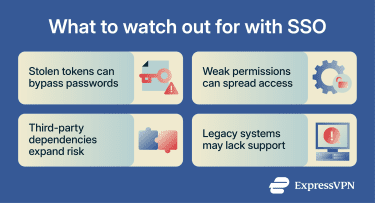
Implementing SSO solutions
A successful SSO rollout starts with choosing a provider that supports the protocols your applications require, integrates with your existing directory services, and aligns with your organization's compliance requirements. Beyond protocol support, evaluate scalability, MFA capabilities, and the quality of vendor support.
Deployment typically follows a structured sequence: choose an SSO method, set up the IdP, configure each SP to trust it, add MFA and RBAC, then test with a pilot group before rolling out organization-wide. Piloting with a smaller group helps surface integration issues early and gives users time to adjust before the switch affects everyone.
Once live, ongoing maintenance matters as much as the initial setup. Periodically review access policies, audit sign-in activity, and update integrations as your application landscape changes.
SSO and MFA: How they work together
SSO and MFA solve different problems. SSO reduces login friction by letting users authenticate once. MFA strengthens that authentication by requiring more than one form of verification, such as a password plus a fingerprint, a security key, or a code from an authenticator app.
The most effective deployments combine both: SSO handles the single login, and MFA adds another check that the person logging in is who they claim to be. This helps reduce the risk of a single point of failure discussed earlier, though the level of protection depends on the MFA method used.
SSO as part of a broader identity strategy
SSO is one component of a larger identity and access management (IAM) framework. When integrated with directory services and identity governance tools, it can simplify provisioning (granting access when someone joins) and deprovisioning (revoking it when they leave). It also supports a broader zero-trust strategy, in which trust is not granted implicitly, and access decisions are continually evaluated.
Also read: What is identity verification? A comprehensive overview.
When businesses should consider SSO
SSO becomes especially valuable as an organization's application count grows. In Okta’s 2022 Businesses at Work report, organizations deploy an average of 89 apps, while companies with 2,000 or more employees deploy an average of 187 apps. Among long-tenured Okta customers, that figure rises to 210, and large companies in that group average 383 apps. More recent Okta reporting says the global average has now topped 100 apps per customer.
But SSO isn't only for large enterprises. Smaller organizations that rely on multiple cloud services can also benefit from centralized authentication and reduced IT support overhead. Industries with strict regulatory requirements, such as healthcare and education, can also benefit from more centralized access controls and sign-in visibility.
The key questions are whether SSO integrates with your existing applications, whether it fits your security and compliance requirements, and whether it can be combined with strong MFA.
FAQ
Is SSO secure for small and large businesses?
Can SSO work with third-party apps?
What happens if an SSO provider goes down?
Can SSO reduce password fatigue?
Which industries benefit most from SSO?
What should I look for in an SSO solution?